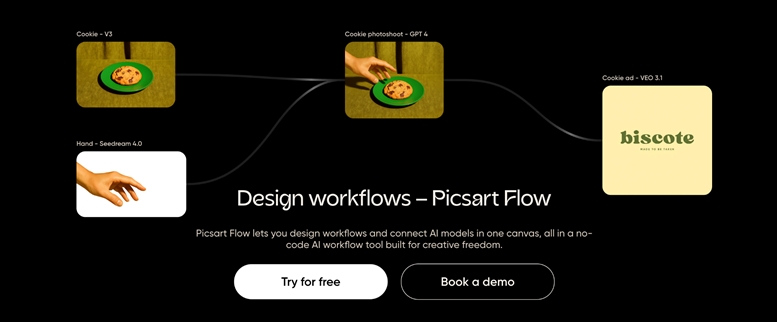
Creative work today is no longer an easy process handled by a single designer working in isolation. Modern content creation involves multiple platforms, formats, stakeholders, and deadlines. Social media teams publish daily, marketing teams run overlapping campaigns, freelancers juggle several clients, and small businesses strive for consistent branding across channels.
As creative demands increase, so does the complexity of managing assets, feedback, versions, and approvals. Traditional approaches such as scattered folders, long message threads, and disconnected tools often fail to scale. Files get lost, feedback becomes fragmented, and teams spend more time coordinating than creating.
This is where structured creative workflows become essential. Instead of treating content as isolated files, teams need systems that reflect how creative work actually happens. Picsart Flows was built to address this exact challenge by providing a smarter and more organized way to manage creative content from idea to final output.
What is Picsart Flows? A High-Level Overview
Modern design workflows require more than simple file storage. They need structure, visibility, and speed, especially when content is produced at scale. Picsart Flows addresses this need by introducing a system that connects creative assets to the process behind them.
Picsart Flows is a workflow management feature designed to help creators and teams organize, track, and collaborate on creative projects within a single structured environment. Rather than relying on generic folders or external task boards, Flows introduces the concept of a flow as a defined creative pipeline.
This tool represents a project, campaign, or recurring content process. Inside it, assets move through clear stages such as draft, review, and final while remaining connected to their context. This structure makes it easier to understand not just what files exist, but where they are in the creative lifecycle.
Built within Picsart, Flows functions as an AI workflow tool that supports faster decision-making and smoother collaboration. It is designed for solo creators, marketing teams, agencies, and anyone managing ongoing visual content.
The Problem With Traditional Creative Content Management
Without a structured AI creative workflow, creative teams often struggle to keep pace with the growing demands for content. Many still rely on a patchwork of tools to manage their work. Design files reside in one place, feedback is received through chat or email, approvals occur verbally, and final assets are stored elsewhere entirely.
This fragmentation creates several common issues. Version control becomes difficult, collaboration slows down, and context is frequently lost. Creators spend unnecessary time clarifying instructions or recreating assets that already exist.
Traditional systems also lack visibility. Managers and collaborators struggle to understand project status at a glance, leading to unnecessary follow-ups and delays. Over time, these inefficiencies compound, reducing content velocity and increasing creative fatigue.
How Picsart Flows Works Step by Step
Using Picsart Flows starts with creating a Flow that represents a project, campaign, or content stream. This could be a weekly social media calendar, a product launch campaign, or a client-specific design pipeline.
Once a Flow is created, assets are added directly into it. Each asset lives inside the Flow rather than as a disconnected file. Users can then assign stages to assets, such as In Progress, Needs Review, or Approved, to reflect their current status.
This structured movement of assets is a practical form of workflow automation. Instead of manually tracking progress across tools, the Flow itself becomes the source of truth. Collaboration happens directly within the Flow, where team members can leave comments, provide feedback, and request changes in context. Updates and iterations remain connected, reducing confusion and eliminating duplicate files.
Key Features That Make Picsart Flows Smarter
One of the most powerful aspects of Picsart Flows is centralized asset management. All related files, edits, and versions live in one place, making it easy to track progress and history. This reduces the risk of lost assets and inconsistent outputs.
This tool also integrates seamlessly with Picsart editing tools, reinforcing its role as an intelligent ai workflow tool rather than just an organizer. Creators can move from planning to execution without switching platforms, which significantly reduces friction.
Visual workflow tracking allows teams to see project status at a glance, improving transparency and accountability. Reusable structures enable teams to replicate successful workflows across campaigns, turning Flows into a repeatable system for creative execution.
Use Cases: How Different Teams Benefit From Picsat Flows
Different teams experience the value of Picsat Flows in different ways, depending on their scale and content needs. Social media teams use Flows to manage daily content pipelines, ensuring posts move smoothly from ideation to publishing.
Marketing teams rely on Flows to coordinate campaigns across multiple channels, keeping visuals consistent and approvals organized. Freelancers use Flows to separate client work into distinct and trackable pipelines, improving clarity and professionalism.
Small businesses benefit by maintaining brand consistency without investing in complex project management software, while agencies gain the ability to manage multiple client projects in parallel without losing visibility or speed.
Productivity Gains: Why Flows Save Time and Reduce Errors
By centralizing assets and feedback, Picsart Flows significantly reduces time spent searching for files or clarifying instructions. Clear stages and ownership minimize unnecessary back and forth, accelerating approval cycles.
Because context is preserved throughout the workflow, creators make fewer mistakes and spend less time reworking assets. Over time, these gains allow teams to produce more content with the same or fewer resources, which is critical in high-volume creative environments.
How Picsart Flows Fits Into a Modern Creative World
Rather than replacing every tool, Picsart Flows complements existing creative stacks by merging workflow management where it matters most. It reduces tool overload by combining organization, collaboration, and execution in one environment.
Flows is simple enough for solo creators yet scalable for growing teams. This flexibility makes it suitable for modern creative operations where speed, clarity, and adaptability are essential.
Best Practices for Using Picsart Flows Effectively
To maximize value, teams should structure Flows around clear objectives such as campaigns, channels, or clients. Consistent naming conventions and stage definitions improve clarity and reduce friction.
Reusing Flow templates for recurring work helps standardize processes while avoiding unnecessary complexity. Feedback discipline is equally important. Keeping discussions inside the Flow ensures decisions are documented, accessible, and tied directly to the relevant asset.
As creative workloads continue to grow, unstructured systems become a liability. Teams that succeed are those that approach creative operations with intention and structure.
Picsart Flows supports this shift by enabling smarter workflows, clearer collaboration, and faster execution. By reducing friction and improving visibility, it empowers creators and teams to focus on what matters most: delivering high-quality creative content efficiently and consistently.
Media Contact
Company Name: PicsArt Inc
Contact Person: Hovhannes Avoyan
Email: Send Email
Country: United States
Website: http://picsart.com/