Introduction
For startups, every decision matters, especially when it comes to spending money on hardware. The goal is simple: get the most productivity possible without sinking cash into bulky, expensive equipment. That’s why many modern startups are rethinking traditional office setups and turning toward smarter, more flexible tools.
One solution that’s gaining serious attention is the use of portable dual monitors. Compact, lightweight, and surprisingly powerful, these setups give teams the benefits of multi-screen workflows without the cost or rigidity of traditional desktop systems. For fast-moving startups, this kind of flexibility can make a real difference.
Why Traditional Office Hardware Holds Startups Back
Classic office setups usually mean desktops, large monitors, heavy desks, and fixed workstations. While they work fine in traditional offices, they’re not ideal for startups that operate remotely, work from coworking spaces, or shift locations frequently.
These setups come with several downsides:
- High upfront costs for desktops and large monitors
- Limited mobility, everything stays in one place
- More maintenance and power consumption
- Difficulty supporting remote or hybrid teams
For startups that value agility, this kind of rigidity can slow things down and eat into budgets.
Portable monitors offer a simpler alternative. They’re lightweight, affordable, and easy to move, making them a better match for teams that don’t want to be tied to one desk or one office.
The Rise of Portable Dual Monitor Setups
Single portable monitors are useful, but dual portable monitors take things to the next level.
A folding dual-screen setup like the UPERFECT Delta gives users two stacked displays in a compact design. You get the workflow benefits of a multi-monitor workstation without doubling hardware costs or desk space. Despite offering two screens, the setup remains lightweight and travel-friendly, making it easy to carry in a backpack along with a laptop.
For startups with distributed teams or flexible work styles, this means employees can enjoy the same efficient setup whether they’re at home, in a coworking space, or meeting clients.
Why Portable Dual Monitors Make Sense for Startups
Lower Costs Without Sacrificing Output
Instead of buying desktops and multiple large monitors, startups can pair laptops with portable dual monitors. The result is similar productivity at a fraction of the cost.
Minimal Desk Space Required
Shared offices and coworking environments often have limited room. A slim, stacked dual-monitor setup takes up far less space than traditional monitors.
Quick, Hassle-Free Setup
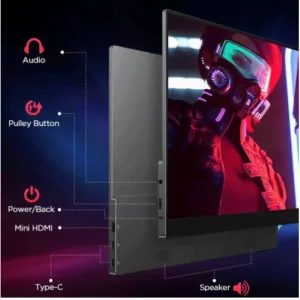
Most portable dual monitors are plug-and-play, connecting easily via USB-C or HDMI. This makes onboarding new employees faster and reduces IT headaches.
Boosted Productivity
Two screens make multitasking easier. One display can hold communication tools or reference material, while the other stays focused on active work like coding, design, or writing.
True Remote Flexibility
Because the monitors are portable, employees can take their setup anywhere. This reduces reliance on fixed office infrastructure and supports hybrid or fully remote work models.
How Portable Dual Monitors Reduce Hardware Spending
Fewer Devices, Same Results
A laptop combined with a portable dual monitor can replace a full desktop workstation. That’s fewer devices to buy, maintain, and replace.
Shared Equipment
Portable monitors can be reassigned easily. When employees travel, work remotely, or leave the company, the hardware doesn’t stay locked to one desk.
Lower Power Usage
Portable displays typically consume much less energy than desktop monitors, helping reduce long-term electricity costs.
Less Risk, More Confidence
With solid warranties and trial periods, startups can invest without worrying too much about early hardware failure or wasted money.
A Real-World Startup Scenario
Picture a small design startup with five team members. Instead of setting up five full desktop stations, each employee uses a laptop paired with a portable dual monitor setup.
At a coworking space, they stack the screens vertically for design work. For a client meeting, they pack the same setup into a bag. At home, they use the same workflow they’re already familiar with.
The result? Consistent performance, lower costs, and a workspace that moves with the team, not the other way around.
Why This Fits Startup Culture Perfectly
Startups thrive on speed, flexibility, and efficiency. Hardware that supports those values isn’t just convenient, it becomes part of the company’s competitive edge.
Portable dual monitors turn a simple laptop into a mobile command center. Team members don’t lose productivity when they change locations, and companies don’t lose money maintaining rigid office setups. Everyone works the same way, wherever they are.
Tips for Startups Getting Started
- Standardize your setup to simplify support and compatibility
- Define screen usage habits, such as dedicating one screen to communication and one to focused work
- Train teams on multi-screen workflows to maximize productivity
- Lean into remote work, reducing fixed office costs
- Plan for growth, knowing that portable hardware scales easily with new hires Final Thoughts
For startups looking to do more with less, portable dual monitors aren’t just a nice upgrade, they’re a smart business move. Solutions like UPERFECT’s folding dual monitor give teams the power of multi-screen productivity without the cost, space, or rigidity of traditional setups.
In a world where work happens everywhere, investing in portable, flexible hardware helps startups stay lean, agile, and ready for whatever comes next.
The future of startup work is mobile, efficient, and adaptable, and portable dual monitors fit right in.